When you encode a video with FFmpeg and x264, you have to tell the encoder what you care about. You can ask for a quality level (CRF) and let the file size fall where it may. Or you can ask for a bitrate, which fixes the file size and lets the quality fall where it may.
Most explanations stop there. We wanted to see what that trade-off looks like in numbers, so we encoded the same two clips both ways, measured every file, and scored the quality. Here's what came out, and how to choose.
The short version
- Use CRF when quality matters more than an exact file size: archiving, editing proxies, uploading to a platform that will re-encode anyway.
- Use a target bitrate (ideally two-pass) when you must hit a size or bitrate: an upload limit, a fixed storage budget, a streaming ladder.
- Use CRF with a bitrate cap when you want consistent quality but can't allow spikes.
What CRF and bitrate actually do
CRF (Constant Rate Factor) is x264's constant-quality mode. FFmpeg's documentation describes the crf option as: "Set the quality for constant quality mode." Lower numbers mean higher quality and bigger files.
In our build, if you don't set -crf at all, libx264 uses 23: we encoded without it and the encoder settings stored in the file read crf=23.0. The top of the scale is 51: asking for 52 gave a file marked crf=51.0.
Bitrate mode (-b:v) tells the encoder how many bits per second to spend on average. With two-pass encoding, the first pass analyses the whole video and the second uses that analysis to place the bits where they're needed while keeping the average on target.
The key difference: CRF holds quality roughly steady and lets the bitrate vary with the content. Bitrate mode holds the bitrate steady and lets the quality vary.
Our test
We used FFmpeg 8.1.2 with libx264 (core 165) on an Apple M4 Max, with the medium preset and no audio. Two 10-second, 1920×1080, 30 fps clips, both generated by FFmpeg's built-in test sources so anyone can reproduce them:
- Clip A – simple:
testsrc2, moving test patterns with large flat areas. - Clip B – complex:
mandelbrot, a continuous fractal zoom full of fine, changing detail.
These are synthetic clips, not camera footage, so treat the exact numbers as an illustration. The pattern is what matters.
We saved both losslessly first, then encoded each at CRF 18, 20, 23, 26 and 28, and with two-pass at 2, 4 and 8 Mbps. Quality was scored with VMAF (libvmaf, model vmaf_v0.6.1), which compares each encode with the lossless source on a 0–100 scale: higher means closer to the original.
Results: CRF
| CRF | Clip A size | Clip A bitrate | Clip A VMAF | Clip B size | Clip B bitrate | Clip B VMAF |
|---|---|---|---|---|---|---|
| 18 | 12.46 MB | 9.97 Mbps | 97.8 | 23.23 MB | 18.58 Mbps | 94.9 |
| 20 | 10.54 MB | 8.43 Mbps | 97.2 | 19.18 MB | 15.35 Mbps | 93.3 |
| 23 | 7.96 MB | 6.36 Mbps | 96.0 | 14.01 MB | 11.21 Mbps | 89.7 |
| 26 | 5.23 MB | 4.19 Mbps | 93.9 | 9.46 MB | 7.57 Mbps | 84.7 |
| 28 | 3.76 MB | 3.01 Mbps | 92.1 | 6.71 MB | 5.37 Mbps | 80.4 |
Results: two-pass bitrate
| Target | Clip A size | Clip A VMAF | Clip B size | Clip B VMAF |
|---|---|---|---|---|
| 2 Mbps | 2.54 MB | 88.6 | 2.56 MB | 67.9 |
| 4 Mbps | 4.99 MB | 93.7 | 5.14 MB | 77.1 |
| 8 Mbps | 9.90 MB | 97.0 | 10.23 MB | 85.9 |
(Sizes in MB = 1,000,000 bytes. Bitrate = file size × 8 ÷ 10 seconds.)
What the numbers show
1. The same CRF gives very different file sizes
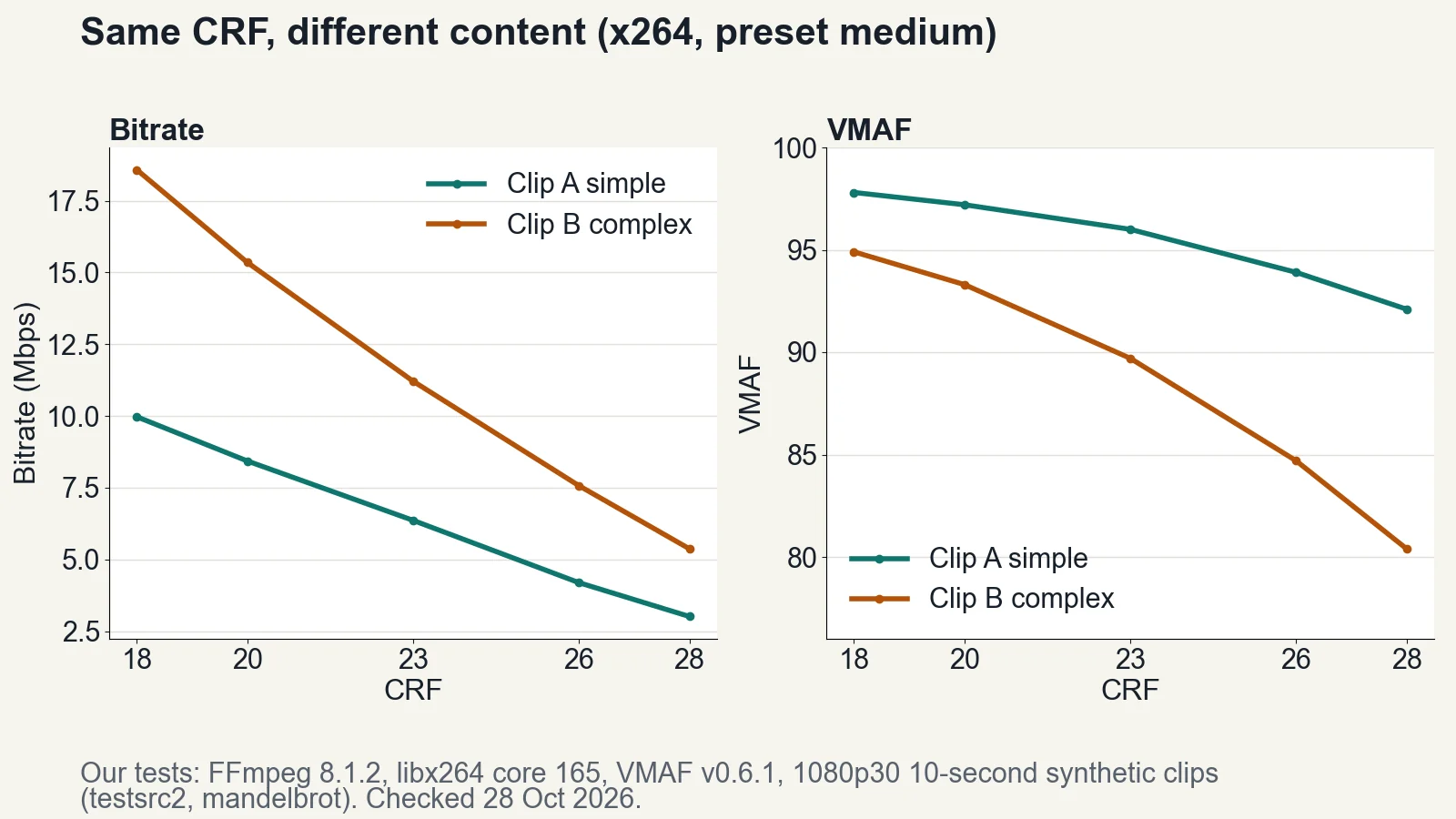
At CRF 23, the simple clip came out at 6.36 Mbps and the complex one at 11.21 Mbps, about 1.8 times as much. CRF doesn't promise a size. It spends whatever the content needs to reach the quality level.
That's the point of CRF. It's also why you can't predict the file size of a CRF encode without trying it.
2. The same bitrate gives very different quality
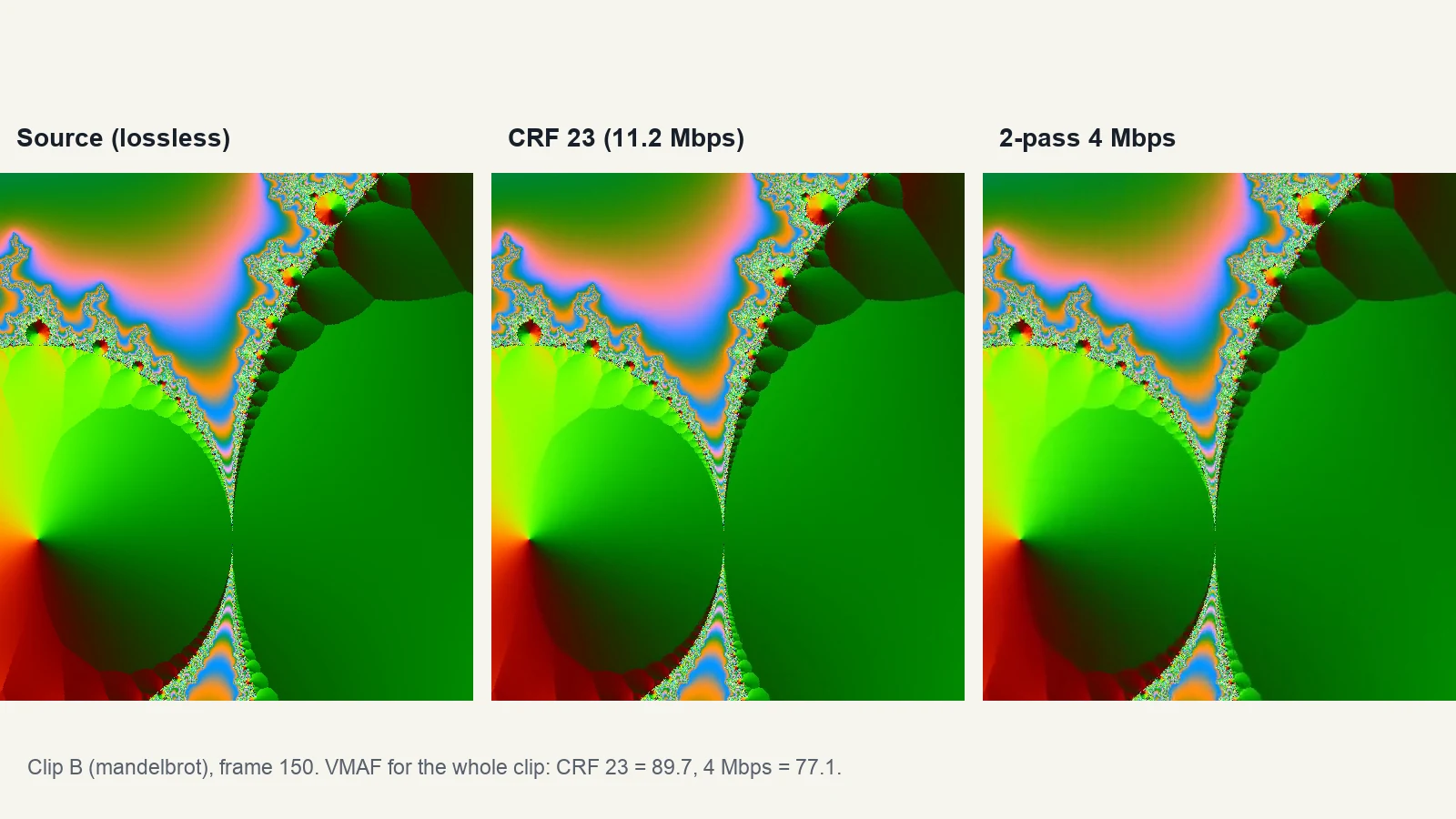
At 4 Mbps two-pass, both files came out almost exactly the same size (4.99 and 5.14 MB). But the simple clip scored 93.7 and the complex one 77.1.
A fixed bitrate is generous for easy content and stingy for hard content. If you pick one bitrate for everything, some videos will look fine and others won't.
3. Each step of CRF changes size a lot
Going from CRF 23 to 28 cut the file to 47% of its size for clip A (7.96 → 3.76 MB) and 48% for clip B (14.01 → 6.71 MB). From 18 to 23 the drop was smaller, to 64% and 60%.
The quality cost grows as you go up: from 23 to 28, VMAF fell 3.9 points on the simple clip but 9.3 on the complex one.
4. At similar sizes, they land close together
Two-pass and CRF aren't different quality engines; they're different ways of deciding how many bits to spend. Compare clip A at CRF 26 (5.23 MB, VMAF 93.9) with clip A at 4 Mbps two-pass (4.99 MB, 93.7): very close. Clip B at CRF 23 is 14.01 MB at 89.7; the 8 Mbps two-pass file is smaller (10.23 MB) and scores lower (85.9), as you'd expect.
So the choice is less about quality and more about which number you need to control: quality or size.
CRF with a cap: the middle ground
Sometimes you want CRF's consistent quality but can't let the bitrate spike, for example when a player or a network link has a maximum. x264 lets you add a ceiling with -maxrate and -bufsize.
We tried CRF 23 with -maxrate 8M -bufsize 16M:
| Clip | Uncapped CRF 23 | Capped CRF 23 |
|---|---|---|
| A (simple) | 6.36 Mbps, VMAF 96.0 | 6.36 Mbps, VMAF 96.0 |
| B (complex) | 11.21 Mbps, VMAF 89.7 | 8.28 Mbps, VMAF 85.9 |
The simple clip never needed more than the cap, so nothing changed. The complex clip was held down from 11.2 to about 8.3 Mbps, and its quality dropped accordingly. The cap only bites when the content demands more than you allow.
The commands
CRF:
ffmpeg -i input.mov -c:v libx264 -preset medium -crf 23 -c:a copy output.mp4
Two-pass at a target bitrate (macOS / Linux; on Windows use NUL instead of /dev/null):
ffmpeg -y -i input.mov -c:v libx264 -preset medium -b:v 4000k -pass 1 -an -f null /dev/null
ffmpeg -i input.mov -c:v libx264 -preset medium -b:v 4000k -pass 2 -c:a copy output.mp4
CRF with a cap:
ffmpeg -i input.mov -c:v libx264 -preset medium -crf 23 -maxrate 8M -bufsize 16M -c:a copy output.mp4
-c:a copy keeps the original audio. If your container doesn't support that audio codec, encode it instead (for example -c:a aac -b:a 128k).
To work out which bitrate you need for a target file size, divide the size by the duration: size (MB) = bitrate (kbps) × seconds ÷ 8 ÷ 1000. Our video file size calculator uses that formula, and the bitrate calculator gives a starting bitrate by resolution and use. For ready-made command lines, see our FFmpeg presets. To check what bitrate a finished file really has, our guide to ffprobe shows how.
So which CRF value?
There's no single right answer, because the same CRF looks different on different content, as the tests show. A practical way to choose:
- Encode a short, representative section at CRF 23 (the default).
- Watch it at the size people will actually view it.
- If it looks good, try a higher CRF to save space; if not, go lower.
- Once you're happy, use that value for similar footage.
If you're comparing codecs as well as settings, our codec comparison covers the differences between H.264, H.265 and others.
FAQ
Is lower CRF better quality?
Yes. Lower CRF means higher quality and bigger files. In our tests, CRF 18 scored 97.8 VMAF on the simple clip, against 92.1 at CRF 28, but was more than three times the size.
What is the default CRF in FFmpeg?
With libx264 it's 23. We confirmed it by encoding without -crf: the encoder settings in the output read crf=23.0.
CRF 18 vs 23: is the difference visible?
It depends on the content. On our simple clip, VMAF went from 96.0 at CRF 23 to 97.8 at CRF 18; on the complex clip, from 89.7 to 94.9. Check a sample of your own footage.
Is two-pass better than CRF?
Not in quality per byte. At similar file sizes our results were close. Two-pass is the tool for hitting a specific size or bitrate; CRF is for hitting a quality level.
Why is my CRF file so big?
Because the content is complex. CRF spends whatever bits the content needs. In our test, the same CRF 23 produced 6.36 Mbps on simple content and 11.21 Mbps on complex content. Raise the CRF, or add -maxrate and -bufsize to cap it.
Sources
| Source | URL | Checked |
|---|---|---|
| FFmpeg Codecs Documentation, libx264 options (crf, preset) | https://ffmpeg.org/ffmpeg-codecs.html | 20261028 |
| Local tests: FFmpeg 8.1.2, libx264 core 165 r3222, libvmaf vmaf_v0.6.1, Apple M4 Max; sources testsrc2 and mandelbrot, 1920×1080, 30 fps, 10 s | — (run on our own machine) | 20261028 |
How to reproduce the sources:
ffmpeg -f lavfi -i "testsrc2=size=1920x1080:rate=30" -t 10 -c:v ffv1 -pix_fmt yuv420p srcA.mkv
ffmpeg -f lavfi -i "mandelbrot=size=1920x1080:rate=30,format=yuv420p" -t 10 -c:v ffv1 srcB.mkv
VMAF was measured with:
ffmpeg -i encoded.mp4 -i srcA.mkv -lavfi "[0:v]setpts=N/30/TB[d];[1:v]setpts=N/30/TB[r];[d][r]libvmaf=n_threads=8" -f null -
Related tools and guides
- Pick a CRF value for your use case: CRF Calculator
- Work out a target bitrate: Bitrate Calculator
- Estimate the exported file size: Video File Size Calculator
- Copy-ready export commands: FFmpeg Encoding Presets
- Compare codecs: Video Codec Comparison